Understanding pentesting
From the Docker image to the report: who prepares the tools, who decides, and where your data stays.
A pentest searches for weaknesses in an application you authorize for testing. Your AI proposes checks; local tools execute them within the approved limits. You receive a report with observations, verified findings, and the limits of the assessment.
These diagrams explain the experimental local workflow. They do not prove compatibility with every AI tool: human confirmations and separate missions must be verified in your environment. Execution against a remote target remains unavailable.
1. What is inside the Docker image?
The toolbox is the pentest kit: security tools, a local engine that organizes the tests, and report generation. The Docker image packages these elements and their versions. Docker uses this image to run containers, separate execution environments on your machine.
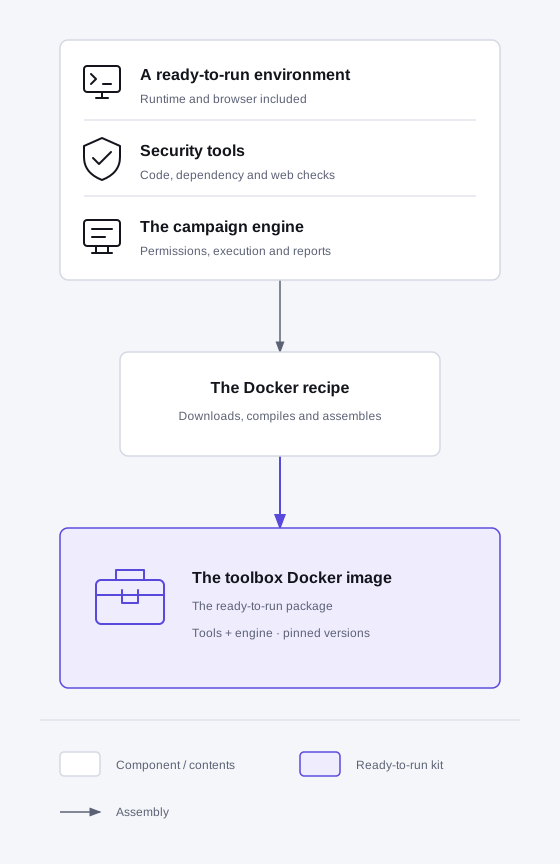
Your agent retrieves the preparation resources, then builds the image with Docker after your approval. You do not need to write a Docker recipe. The build runs on your machine; no continuous integration service is required. The versions are then fixed. Separate checks verify that the tools are present and work.
The toolbox is separate from your application and is not limited to Grace projects. Your operator chooses a local mode with synthetic data:
| Mode | What runs on your machine |
|---|---|
| Isolated laboratory | A disposable copy of the application in its own containers, recreated for every mission. |
| Existing application | Your Web application or API is already running. The pentest sends approved HTTP(S) requests to its local addresses; it does not start, stop, or reset the application. |
In the second mode, state is shared between missions and approved writes can persist. Review the declared external dependencies too: the application retains its own outbound connections. Its version is declared by the operator, without attesting the running process. This mode covers HTTP authorization, authentication, injection-canary, and business-logic checks. It does not automate desktop or mobile application interfaces.
These Web/API tests require neither Appium nor Xcode; your application does not need to be exposed to the Internet. Installing Appium does not enable desktop or mobile interface automation in this workflow.
2. How does the AI use the tools?
A campaign groups the authorized tests. The AI remains in your chosen tool, outside the toolbox. It communicates with the local engine through MCP, the protocol that connects an AI agent to its tools.
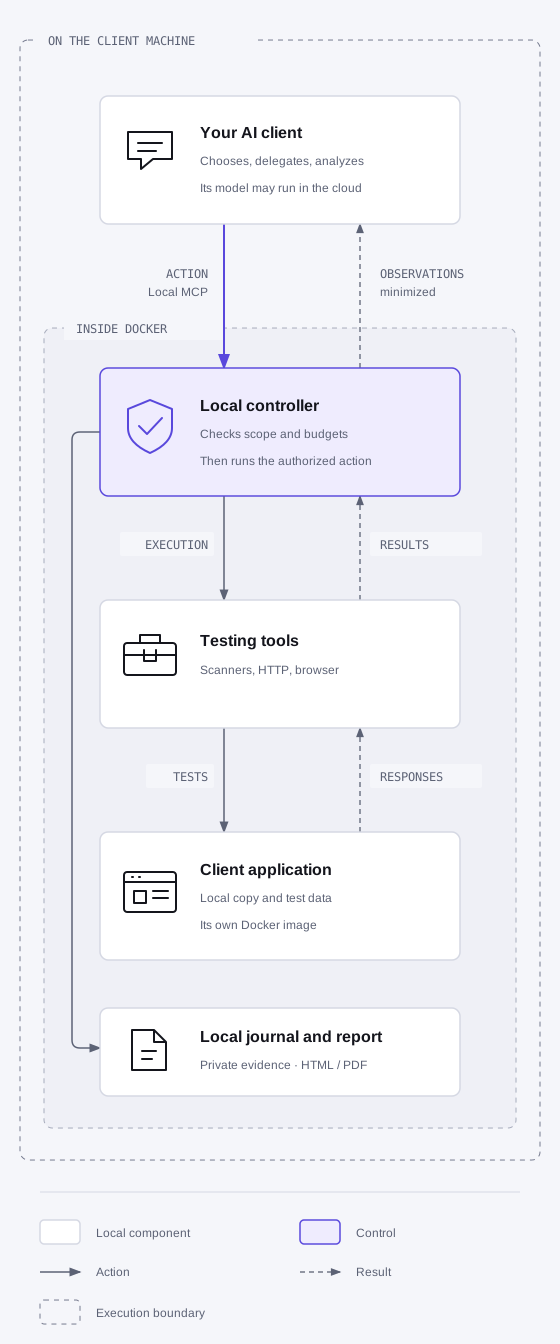
- You authorize the plan. Review the target, synthetic accounts, actions, duration, budgets, and data the AI provider may receive in the form presented to you.
- The AI chooses an allowed check. The controller, the part of the engine that enforces authorization, checks the request and runs the tool. The AI has no unrestricted terminal in the toolbox.
- The AI analyzes the observation. It receives the permitted extracts, chooses the next check, or concludes. A refusal or uncertain result stops the affected action.
- A separate mission checks the finding. A validator receives the hypothesis and useful evidence in a fresh AI context, without the researcher’s conversation. It attempts to reproduce the issue; insufficient evidence remains visible.
- You read the local report. HTML, and PDF when its export is available, distinguish findings from blocked, incomplete, or unperformed tests. The containers created for the campaign are stopped and their cleanup is checked; evidence is retained. In existing application mode, only pentest resources are released: your application stays running and its data is not restored.
3. Where does the data go?
| Item | During the campaign |
|---|---|
| Application under test | Disposable laboratory or already running local application, with synthetic data; your production system is not the target. |
| Original evidence and report | Kept in private local storage. |
| Observations received by the AI | Reduced, redacted extracts limited to what you authorized. With a cloud model, these extracts may leave your machine. Reducing them does not guarantee anonymization. |
| Grace | Disconnected before testing. Guidance is prepared beforehand; no campaign data is sent to Grace, even if redacted. |
Authorization to test the application and approval of data processing by the AI provider are separate decisions. Reading the report does not authorize corrections: changing code and verifying a fix require a new task and the corresponding approvals. Existing application mode supports a new independent campaign, but does not yet offer a linked retest attesting that a particular revision was fixed.
Start preparation
You need Docker running on your AI agent’s machine, the test application in the chosen mode, and verified support for human confirmations and separate missions in your AI tool. Then follow the pentest setup guide.
The result to check is a report explaining what was actually tested and what remains unknown. A report with no findings does not guarantee the absence of vulnerabilities.